Screenshots
See it in action
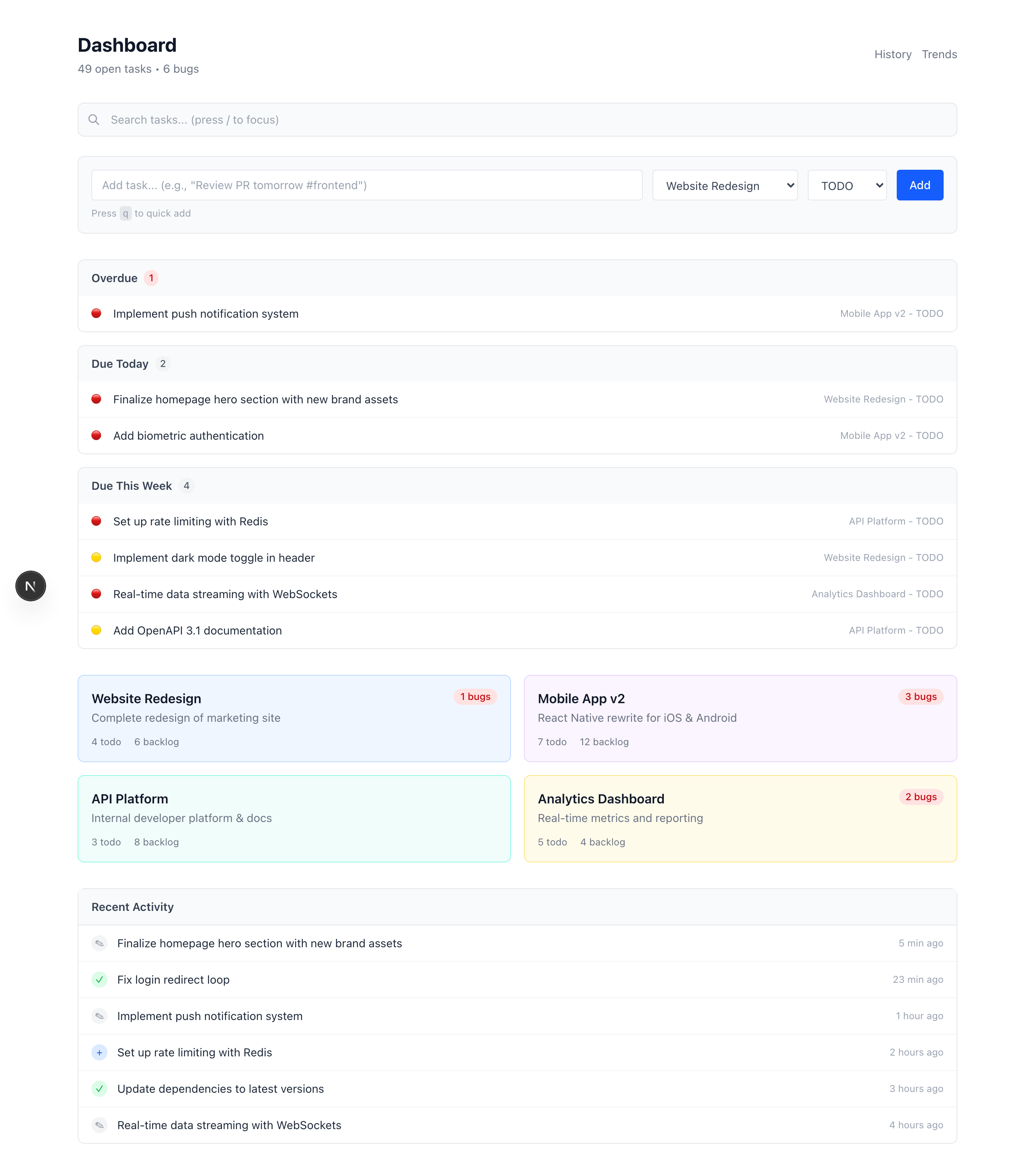
Dashboard — See all your projects at a glance
1 / 9
Turn your RTM lists into a project management dashboard. TODOs, backlog, bugs, and decisions — all your projects at a glance.
Features
Each project gets a card showing TODOs, backlog, bugs, and decisions. Scan all your projects in seconds.
Real-time task counts pulled directly from RTM. No stale data — always see your current status.
Visual indicators show project health. Green for on-track, orange for attention needed, red for blocked.
Click any project card to jump straight to that project's GitHub repo. Fast context switching.
Screenshots
Installation
You'll need:
# Clone the repository
git clone https://github.com/donkitchen/milk-pm.git
cd milk-pm

# Install dependencies
npm install

# Copy environment template
cp .env.example .env
Edit .env with your RTM credentials:
RTM_API_KEY=your_api_key
RTM_SHARED_SECRET=your_shared_secret
RTM_AUTH_TOKEN=your_auth_token
If you've already set up milk-mcp, you can copy credentials from ~/.milk-mcp/config.json
# Start the development server
npm run dev

# Open in browser
http://localhost:3000
Your projects will appear automatically — any RTM list following the milk-mcp naming convention shows up as a project card.